> ## Documentation Index
> Fetch the complete documentation index at: https://docs.chipperg.xyz/llms.txt
> Use this file to discover all available pages before exploring further.

# Warmup

> Fund and build activity on wallets.

## Setting up Warmup

Open **Warmup**, pick a chain and the wallets or folders to warm, then set payment asset, volume, and loop count.
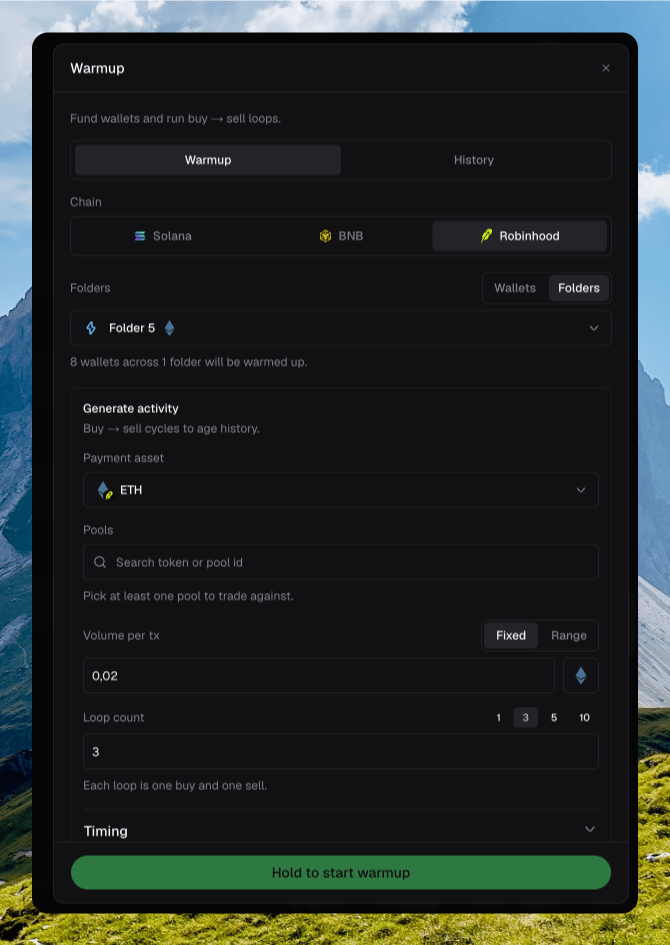
<Frame caption="The Warmup panel with chain, folders, and activity settings">
  <img src="https://mintcdn.com/chipper/IV3zXQ3wrbTXdJwj/assets/wallets/warmup-panel.png?fit=max&auto=format&n=IV3zXQ3wrbTXdJwj&q=85&s=de0a279a4cdfcc38b6683ce7b1b69ad7" alt="Warmup dialog on Robinhood with Folder 5 selected, ETH payment asset, volume, and loop count" width="670" height="945" data-path="assets/wallets/warmup-panel.png" />
</Frame>

<Frame caption="Filling in Warmup and reviewing the setup">
  <video autoPlay src="https://mintcdn.com/chipper/IV3zXQ3wrbTXdJwj/assets/wallets/warmup.mp4?fit=max&auto=format&n=IV3zXQ3wrbTXdJwj&q=85&s=488d4281735852ef93099e0cac2c77c8" data-path="assets/wallets/warmup.mp4" />
</Frame>

## Pools

Pick at least one pool to trade against. Search by token or pool id.
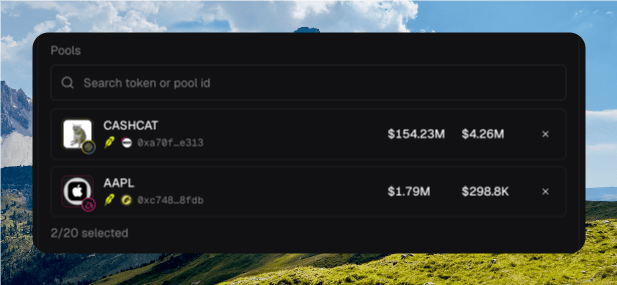
<Frame caption="The pools picker with selected pools">
  <img src="https://mintcdn.com/chipper/IV3zXQ3wrbTXdJwj/assets/wallets/warmup-platforms.png?fit=max&auto=format&n=IV3zXQ3wrbTXdJwj&q=85&s=1b0516271ea23bd5c2a89ffc4389d4ab" alt="Warmup pools picker showing CASHCAT and AAPL selected, with 2 of 20 selected" width="617" height="285" data-path="assets/wallets/warmup-platforms.png" />
</Frame>
