> ## Documentation Index
> Fetch the complete documentation index at: https://docs.chipperg.xyz/llms.txt
> Use this file to discover all available pages before exploring further.

# Fund

> Top up from a wallet or CEX.

## Funding from a wallet

Open **Fund**, pick a source wallet, a destination, and an amount. Review the quote before you submit.

<Frame caption="Funding from a wallet: source, destination, amount, and quote">
  <video autoPlay src="https://mintcdn.com/chipper/P_zNBB0887RS4Gqr/assets/wallets/fund-from-wallet.mp4?fit=max&auto=format&n=P_zNBB0887RS4Gqr&q=85&s=22dd4a47d19c29aa7c58e33c48b8ede7" data-path="assets/wallets/fund-from-wallet.mp4" />
</Frame>

## Funding from a CEX

Switch Fund to the CEX source. Pick a provider and fill in the fields the flow asks for.

<Frame caption="Funding from a CEX: provider picker and deposit fields">
  <video autoPlay src="https://mintcdn.com/chipper/P_zNBB0887RS4Gqr/assets/wallets/fund-from-cex.mp4?fit=max&auto=format&n=P_zNBB0887RS4Gqr&q=85&s=781cad947285690a2a85de614454534b" data-path="assets/wallets/fund-from-cex.mp4" />
</Frame>

## Fees

Fund charges a fee on this route. The quote or summary shows the amount before you confirm.
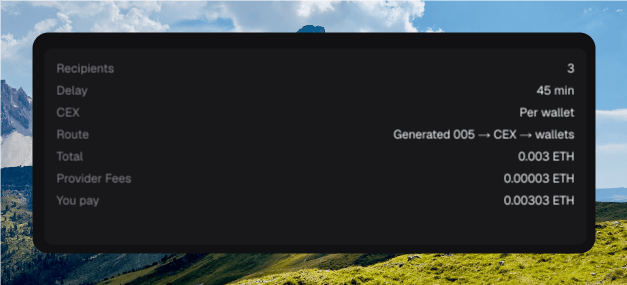
<Frame caption="The Fund panel with the fee in the quote">
  <img src="https://mintcdn.com/chipper/P_zNBB0887RS4Gqr/assets/wallets/fund-fee.png?fit=max&auto=format&n=P_zNBB0887RS4Gqr&q=85&s=4907db514913d29c418a59b5f3998d93" alt="Fund dialog showing source, destination, amount, and a fee line in the quote summary" width="627" height="285" data-path="assets/wallets/fund-fee.png" />
</Frame>
