> ## Documentation Index
> Fetch the complete documentation index at: https://docs.chipperg.xyz/llms.txt
> Use this file to discover all available pages before exploring further.

# Add wallets

> Generate, import, move, or assign wallets.

## Generate

Open **Add wallets** and stay on **Generate**. Set the count, network, and destination folder, then submit. New rows land in the table.

<Frame caption="Generating wallets with count, network, and folder">
  <video autoPlay src="https://mintcdn.com/chipper/P_zNBB0887RS4Gqr/assets/wallets/generate-wallets.mp4?fit=max&auto=format&n=P_zNBB0887RS4Gqr&q=85&s=f98fcc039ce8a3daf7d2b9a7cb4e628d" data-path="assets/wallets/generate-wallets.mp4" />
</Frame>

## Import

Switch to the **Import** tab and paste keys. Set the network and destination folder before you confirm.

<Frame caption="Importing wallets from pasted keys">
  <video autoPlay src="https://mintcdn.com/chipper/P_zNBB0887RS4Gqr/assets/wallets/import-wallets.mp4?fit=max&auto=format&n=P_zNBB0887RS4Gqr&q=85&s=35016d5ae182357fa3b95f200cafed72" data-path="assets/wallets/import-wallets.mp4" />
</Frame>

## Move and Assign

The same dialog has **Move** and **Assign** tabs. **Move** replaces every folder membership. **Assign** adds a folder and keeps existing ones.
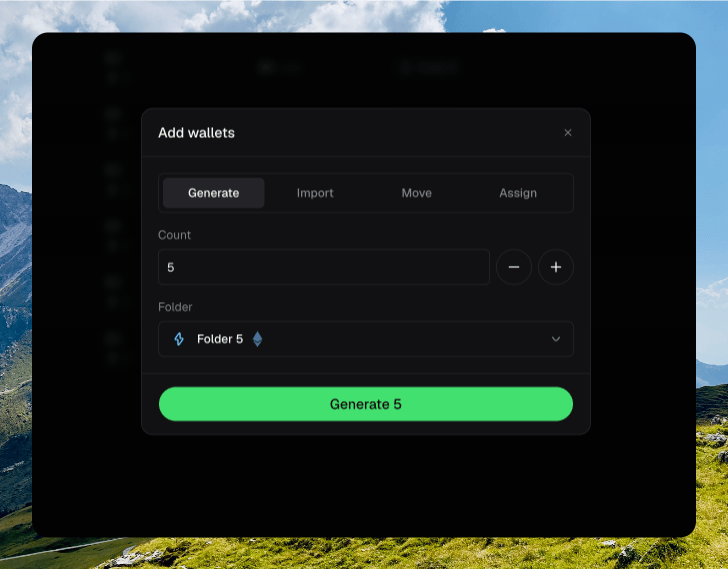
<Frame caption="The Add wallets dialog with Move or Assign selected">
  <img src="https://mintcdn.com/chipper/P_zNBB0887RS4Gqr/assets/wallets/add-wallets-tabs.png?fit=max&auto=format&n=P_zNBB0887RS4Gqr&q=85&s=ef929505aba67a1312235bbc4b7a12e9" alt="Add wallets dialog showing Generate, Import, Move, and Assign tabs with Move or Assign selected" width="728" height="569" data-path="assets/wallets/add-wallets-tabs.png" />
</Frame>

## Naming wallets

Rename a wallet from the drawer **Settings** panel, or inline from the table name.

<Frame caption="Renaming a wallet inline or from the drawer">
  <video autoPlay src="https://mintcdn.com/chipper/P_zNBB0887RS4Gqr/assets/wallets/rename-wallet.mp4?fit=max&auto=format&n=P_zNBB0887RS4Gqr&q=85&s=54ff42dd228138e19d5f0287a6af30ed" data-path="assets/wallets/rename-wallet.mp4" />
</Frame>
