> ## Documentation Index
> Fetch the complete documentation index at: https://docs.chipperg.xyz/llms.txt
> Use this file to discover all available pages before exploring further.
# Trade Sidebar
> Place a buy or sell from the token page.
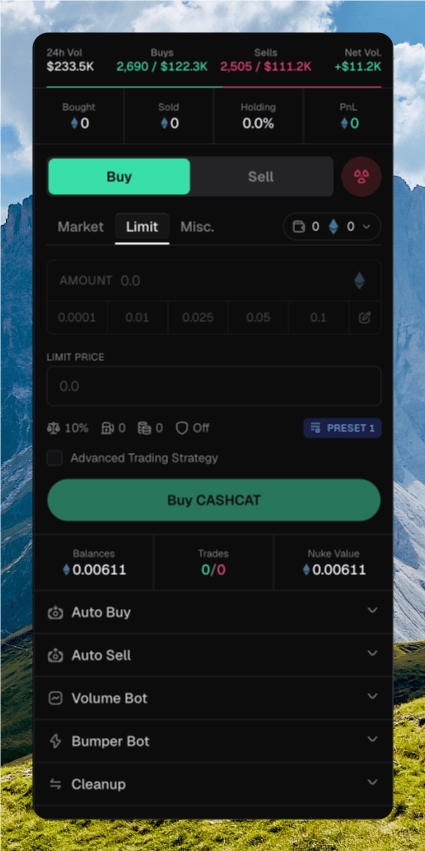
The trade sidebar sits on the right of every [token page](/trading/token-page). It is the form for a market buy or sell across the wallets you have selected.
 ## Placing a trade
Click **Buy** or **Sell**, or press **B** / **⇧ S**. Stay on **Market**.
Open the wallet picker. Chipper trades from every wallet you check.
Type an amount, or click a preset chip. Press **1–9** to apply a chip by position. Press **U** to switch native and USD.
Click **Buy {ticker}** or **Sell {ticker}**, or press **⌘ Enter**. Several wallets append **· N wallets**.
The sidebar does not ask you to confirm a market trade. [Instant Trade](/trading/quick-trade#instant-trade) only affects wallet-row chips.
Click **Bought**, **Sold**, or **PnL** to switch native and USD. Click **Holding** to switch USD and supply percent.
On Robinhood, the app header sets the trade quote: **ETH** or **USDG**. USDG buys and sells use USDG. They do not size from ETH balance.
## Selecting wallets
The wallet picker shows how many wallets are selected, plus their native balance. If you are trading a quote token, it shows that balance too.
* **Select All** / **Unselect All**
* **Select All with Balance** / **Unselect All with Balance**
* Per-wallet checkboxes. The developer wallet shows a **Dev** badge.
## Placing a trade
Click **Buy** or **Sell**, or press **B** / **⇧ S**. Stay on **Market**.
Open the wallet picker. Chipper trades from every wallet you check.
Type an amount, or click a preset chip. Press **1–9** to apply a chip by position. Press **U** to switch native and USD.
Click **Buy {ticker}** or **Sell {ticker}**, or press **⌘ Enter**. Several wallets append **· N wallets**.
The sidebar does not ask you to confirm a market trade. [Instant Trade](/trading/quick-trade#instant-trade) only affects wallet-row chips.
Click **Bought**, **Sold**, or **PnL** to switch native and USD. Click **Holding** to switch USD and supply percent.
On Robinhood, the app header sets the trade quote: **ETH** or **USDG**. USDG buys and sells use USDG. They do not size from ETH balance.
## Selecting wallets
The wallet picker shows how many wallets are selected, plus their native balance. If you are trading a quote token, it shows that balance too.
* **Select All** / **Unselect All**
* **Select All with Balance** / **Unselect All with Balance**
* Per-wallet checkboxes. The developer wallet shows a **Dev** badge.
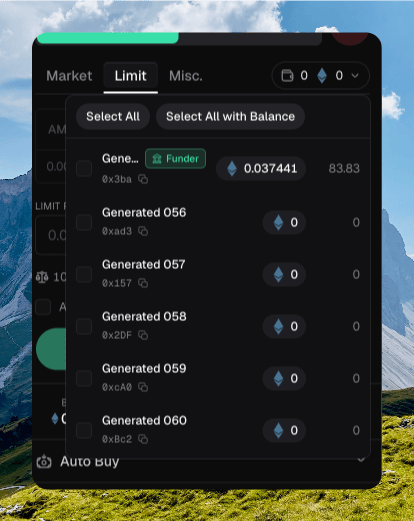 Selecting the developer wallet asks **Select developer wallet?** Trading from it can expose or dump the supply. Check **Do not show again** to skip that dialog on this device.
## Slippage and execution
The row under the amount opens **Trading Settings**. Those values come from the active [trading preset](/platform/presets).
| Field | What it does |
| ------------ | ---------------------------------------- |
| **Slippage** | How far the fill can move, as a percent. |
| **Priority** | Priority fee. |
| **Tip** | Extra tip for inclusion. |
| **MEV Mode** | **Off**, **Reduced**, or **Secure**. |
Selecting the developer wallet asks **Select developer wallet?** Trading from it can expose or dump the supply. Check **Do not show again** to skip that dialog on this device.
## Slippage and execution
The row under the amount opens **Trading Settings**. Those values come from the active [trading preset](/platform/presets).
| Field | What it does |
| ------------ | ---------------------------------------- |
| **Slippage** | How far the fill can move, as a percent. |
| **Priority** | Priority fee. |
| **Tip** | Extra tip for inclusion. |
| **MEV Mode** | **Off**, **Reduced**, or **Secure**. |
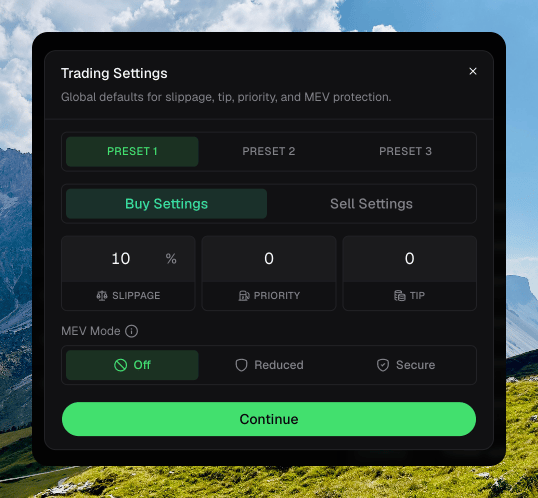 Buy and sell store their own values. Switch presets with **⌥ 1–3**, the footer chip, or the preset chip on this row. See [Trade Settings](/trading/trade-settings) for the amount chips.
## Reading the result
Chipper toasts as the trade lands.
* **Submitting trade…** while it goes out.
* **Trade submitted** with an estimated fill. Several wallets show `{submitted}/{total} trades submitted`.
* **Buy confirmed** or **Sell confirmed** when the fill lands. Failures toast **Trade failed** or **Trade reverted**.
Confirmed trades appear on **Trades**, [Activity](/platform/activity), and the wallet row.
## Other sidebar actions
The bottom row has **Balances**, **Trades**, **Nuke Value**, and [Creator Fees](/launch/creator-fees) when the protocol supports them.
**Nuke** sells the attached wallets in one action. It is available on BNB and Robinhood, not Solana. The dialog can include the developer wallet and a single transaction. Hold to confirm. This cannot be undone.
**Misc.** is [Lock](/trading/lock) and [Burn](/trading/burn). Press **⇧ M**.
Buy and sell store their own values. Switch presets with **⌥ 1–3**, the footer chip, or the preset chip on this row. See [Trade Settings](/trading/trade-settings) for the amount chips.
## Reading the result
Chipper toasts as the trade lands.
* **Submitting trade…** while it goes out.
* **Trade submitted** with an estimated fill. Several wallets show `{submitted}/{total} trades submitted`.
* **Buy confirmed** or **Sell confirmed** when the fill lands. Failures toast **Trade failed** or **Trade reverted**.
Confirmed trades appear on **Trades**, [Activity](/platform/activity), and the wallet row.
## Other sidebar actions
The bottom row has **Balances**, **Trades**, **Nuke Value**, and [Creator Fees](/launch/creator-fees) when the protocol supports them.
**Nuke** sells the attached wallets in one action. It is available on BNB and Robinhood, not Solana. The dialog can include the developer wallet and a single transaction. Hold to confirm. This cannot be undone.
**Misc.** is [Lock](/trading/lock) and [Burn](/trading/burn). Press **⇧ M**.