> ## Documentation Index
> Fetch the complete documentation index at: https://docs.chipperg.xyz/llms.txt
> Use this file to discover all available pages before exploring further.
# Quick Trade
> Buy and sell from a wallet row in one click.
Quick-trade chips sit on each wallet row on a [token page](/trading/token-page). They buy or sell from that wallet only.
## Quick-trade chips
Open the **Wallets** tab. The **Individual Trade** column has a row of buy chips and a row of sell chips.
Chip values come from the active [trading preset](/platform/presets). You get one to eight chips per side. Edit them in [Trade Settings](/trading/trade-settings).
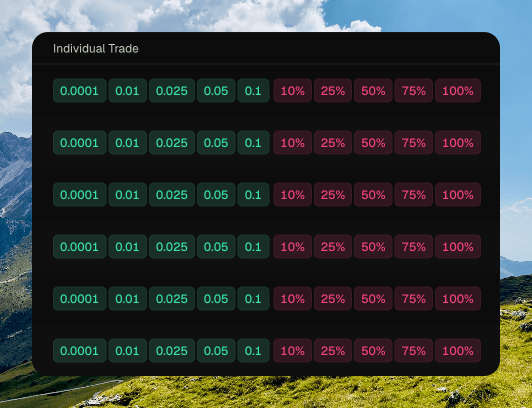 Hover a chip to see which wallet it trades from, and the amount.
## Trade amount modes
Each side has its own mode.
* **Percent** sizes the trade from that wallet's balance. Buy uses native balance. Sell uses token holdings. Percent is the default.
* **Fixed** uses a set native amount on buy, or a set token amount on sell.
Switch the mode in [Trade Settings](/trading/trade-settings).
## Per-currency amounts
Fixed buy chips are stored per native currency: **SOL**, **ETH**, and **BNB**. Switching the currency in Trade Settings shows that currency's chips. The percent numbers do not carry over.
## Instant Trade
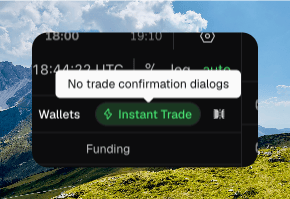
**Instant Trade** skips the confirmation dialog on wallet-row chips. It is stored on this device.
Turn it on from the Wallets toolbar, or from **Settings → Trading**. When it is off, a chip opens **Confirm buy** or **Confirm sell**. That dialog can **Enable Instant Trade** for the next click.
Hover a chip to see which wallet it trades from, and the amount.
## Trade amount modes
Each side has its own mode.
* **Percent** sizes the trade from that wallet's balance. Buy uses native balance. Sell uses token holdings. Percent is the default.
* **Fixed** uses a set native amount on buy, or a set token amount on sell.
Switch the mode in [Trade Settings](/trading/trade-settings).
## Per-currency amounts
Fixed buy chips are stored per native currency: **SOL**, **ETH**, and **BNB**. Switching the currency in Trade Settings shows that currency's chips. The percent numbers do not carry over.
## Instant Trade
**Instant Trade** skips the confirmation dialog on wallet-row chips. It is stored on this device.
Turn it on from the Wallets toolbar, or from **Settings → Trading**. When it is off, a chip opens **Confirm buy** or **Confirm sell**. That dialog can **Enable Instant Trade** for the next click.
 The [trade sidebar](/trading/trade-sidebar) does not use Instant Trade. Sidebar market submits go out immediately.