> ## Documentation Index
> Fetch the complete documentation index at: https://docs.chipperg.xyz/llms.txt
> Use this file to discover all available pages before exploring further.
# Burn
> Permanently destroy tokens from the trade sidebar.
Burn destroys tokens from the wallets you selected. This cannot be undone.
## Where to find it
Open a [token page](/trading/token-page). In the [trade sidebar](/trading/trade-sidebar), click **Misc.** or press **⇧ M**, then **Burn**.
Burn is on every chain. On Solana, Misc. also has [Lock](/trading/lock).
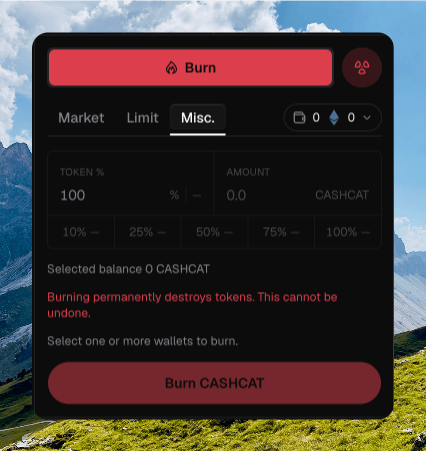 ## Amount
Pick **Token %** or a fixed **Amount**. Editing one updates the other.
Percent presets are **10%**, **25%**, **50%**, **75%**, and **100%**. Each chip shows the approximate token amount.
**Selected balance** is the token balance across the wallets you picked.
Burning permanently destroys tokens. This cannot be undone.
## Wallets
Chipper burns from every wallet you selected. The empty state says **Select one or more wallets to burn.**
The submit button reads **Burn {ticker}**, or **Burn {ticker} · N wallets**.
## What burning does
The tokens are destroyed. They do not move to another wallet.
Chipper toasts **Submitting burn…**, then **Burn confirmed** or **N burns confirmed**. Failures toast **Burn failed**.
## Amount
Pick **Token %** or a fixed **Amount**. Editing one updates the other.
Percent presets are **10%**, **25%**, **50%**, **75%**, and **100%**. Each chip shows the approximate token amount.
**Selected balance** is the token balance across the wallets you picked.
Burning permanently destroys tokens. This cannot be undone.
## Wallets
Chipper burns from every wallet you selected. The empty state says **Select one or more wallets to burn.**
The submit button reads **Burn {ticker}**, or **Burn {ticker} · N wallets**.
## What burning does
The tokens are destroyed. They do not move to another wallet.
Chipper toasts **Submitting burn…**, then **Burn confirmed** or **N burns confirmed**. Failures toast **Burn failed**.