> ## Documentation Index
> Fetch the complete documentation index at: https://docs.chipperg.xyz/llms.txt
> Use this file to discover all available pages before exploring further.
# Overview
> The first screen after you sign in.
Overview is the home of the app. Open it from the header, click the Chipper logo, or press **G** then **O**.
The page has a **Realized** hero at the top, then **Tokens** and **Activity** side by side.
## The PnL chart
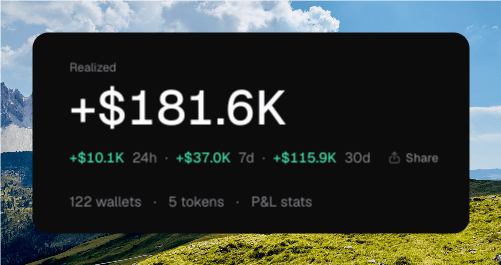
The large number is lifetime **Realized** PnL in USD, across your tracked wallets. Under it, Chipper shows the change over **24h**, **7d**, and **30d**.
The sparkline on the right plots that same realized series for the last month. Hover **Expand**, or click the sparkline, to open the fuller chart.
 Each point on the chart is a cumulative reading, not the gain or loss for that bar.
Overview does not show unrealized PnL. Per-token and per-wallet breakdowns live on those pages.
## Summary metrics
The hero also links your workspace at a glance.
* **Wallets** is how many non-archived wallets you have. Click it to open [Wallets](/wallets/wallets).
* **Tokens** is how many non-archived launches you have. Click it to open [Tokens](/trading/tokens).
* **Manage wallets** goes to the wallet table.
* **Create token** starts a [launch](/launch/launch).
## Realized stats
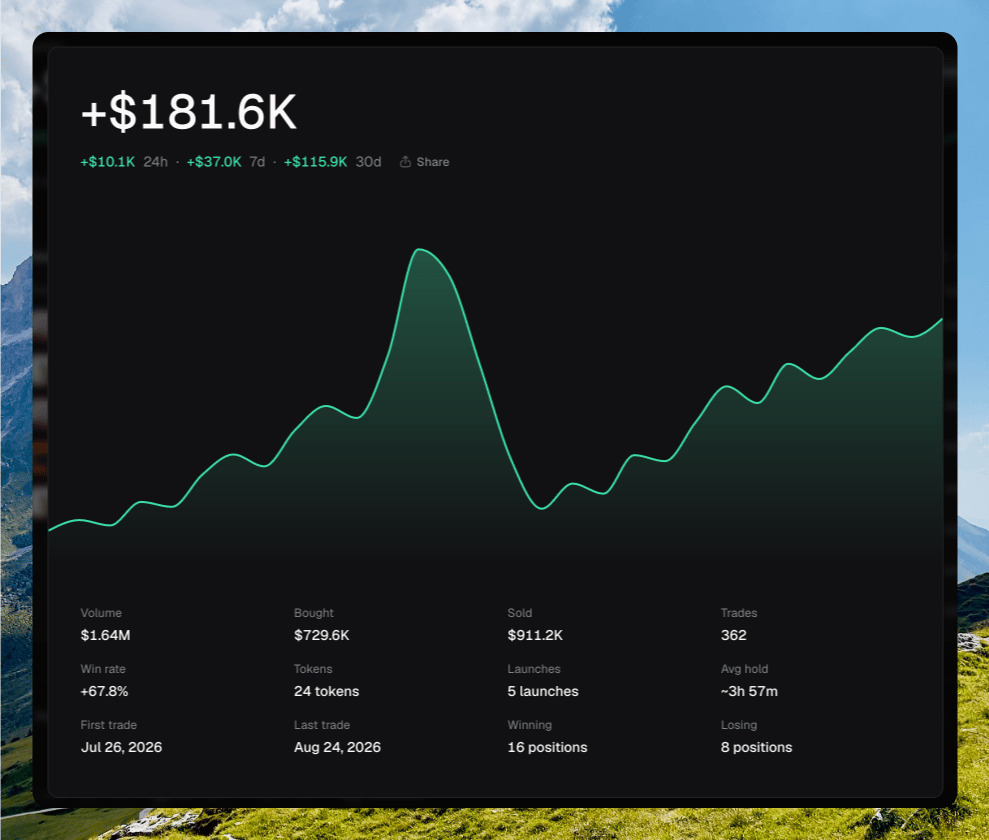
Click **P\&L stats**, or the sparkline, to open the realized stats drawer.
The drawer repeats the lifetime total and the 24h / 7d / 30d row, then the interactive chart, then these tiles:
| Tile | What it shows |
| --------------- | --------------------------------------- |
| **Volume** | Total traded volume, in USD. |
| **Bought** | Total bought, in USD. |
| **Sold** | Total sold, in USD. |
| **Trades** | Number of trades. |
| **Win rate** | Percent of positions that closed green. |
| **Tokens** | Unique tokens traded. |
| **Launches** | How many tokens you launched. |
| **Avg hold** | Typical time a position stayed open. |
| **First trade** | Date of the earliest trade. |
| **Last trade** | Date of the latest trade. |
| **Winning** | Positions that closed green. |
| **Losing** | Positions that closed red. |
Swipe down or click the backdrop to close the drawer.
Each point on the chart is a cumulative reading, not the gain or loss for that bar.
Overview does not show unrealized PnL. Per-token and per-wallet breakdowns live on those pages.
## Summary metrics
The hero also links your workspace at a glance.
* **Wallets** is how many non-archived wallets you have. Click it to open [Wallets](/wallets/wallets).
* **Tokens** is how many non-archived launches you have. Click it to open [Tokens](/trading/tokens).
* **Manage wallets** goes to the wallet table.
* **Create token** starts a [launch](/launch/launch).
## Realized stats
Click **P\&L stats**, or the sparkline, to open the realized stats drawer.
The drawer repeats the lifetime total and the 24h / 7d / 30d row, then the interactive chart, then these tiles:
| Tile | What it shows |
| --------------- | --------------------------------------- |
| **Volume** | Total traded volume, in USD. |
| **Bought** | Total bought, in USD. |
| **Sold** | Total sold, in USD. |
| **Trades** | Number of trades. |
| **Win rate** | Percent of positions that closed green. |
| **Tokens** | Unique tokens traded. |
| **Launches** | How many tokens you launched. |
| **Avg hold** | Typical time a position stayed open. |
| **First trade** | Date of the earliest trade. |
| **Last trade** | Date of the latest trade. |
| **Winning** | Positions that closed green. |
| **Losing** | Positions that closed red. |
Swipe down or click the backdrop to close the drawer.
 ## Share PnL
**Share** on the hero or in the drawer opens a card you can copy or download. The card is titled **GLOBAL**. You can toggle **Wallets** and **User**, pick a background, or upload your own.
## Tokens and Activity
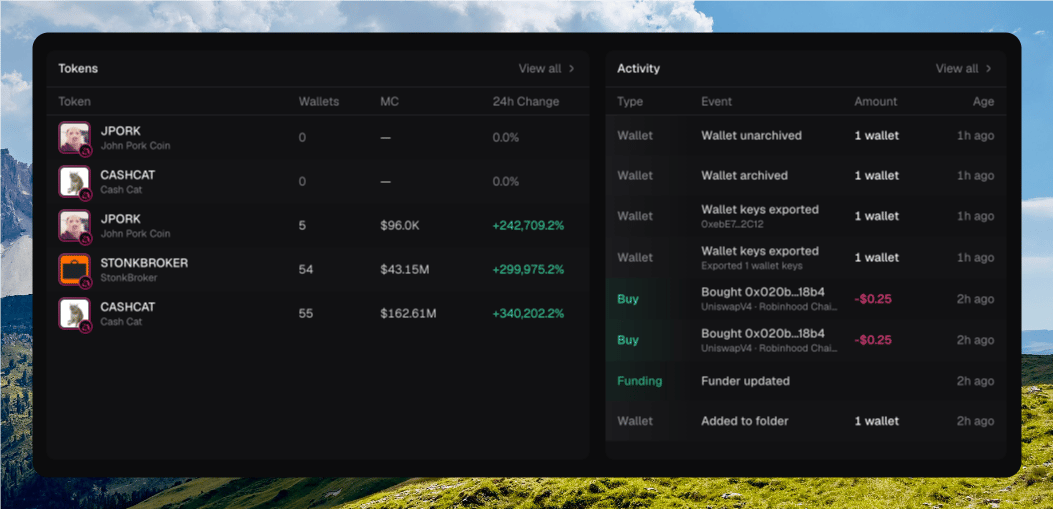
The two panels preview the rest of the app. Each shows up to eight rows.
* **Tokens** lists token, wallets, market cap, and 24h change. **View all** opens [Tokens](/trading/tokens). Right-click a row for **Copy address**, **Open explorer**, and **Archive**.
* **Activity** lists type, event, amount, and age. **View all** opens [Activity](/platform/activity).
If you have no holdings yet, Tokens offers **Create token** and **Add wallet**. Activity stays empty until buys, sells, deploys, or funding land.
## Share PnL
**Share** on the hero or in the drawer opens a card you can copy or download. The card is titled **GLOBAL**. You can toggle **Wallets** and **User**, pick a background, or upload your own.
## Tokens and Activity
The two panels preview the rest of the app. Each shows up to eight rows.
* **Tokens** lists token, wallets, market cap, and 24h change. **View all** opens [Tokens](/trading/tokens). Right-click a row for **Copy address**, **Open explorer**, and **Archive**.
* **Activity** lists type, event, amount, and age. **View all** opens [Activity](/platform/activity).
If you have no holdings yet, Tokens offers **Create token** and **Add wallet**. Activity stays empty until buys, sells, deploys, or funding land.
 ## Where to go next
The full log of buys, sells, deploys, and funding.
The table, folders, and wallet actions.
Jump to a token by name, ticker, or contract.
Move through Chipper without the mouse.
## Where to go next
The full log of buys, sells, deploys, and funding.
The table, folders, and wallet actions.
Jump to a token by name, ticker, or contract.
Move through Chipper without the mouse.