> ## Documentation Index
> Fetch the complete documentation index at: https://docs.chipperg.xyz/llms.txt
> Use this file to discover all available pages before exploring further.
# Invite codes
> Share access to Chipper.
Chipper is invite-only. Open **Invite codes** from your avatar → **Settings**.
Each code is a link that opens the Telegram bot with the license key already filled in. Send that link. The person you invite [signs in](/get-started/sign-in) from there.
 ## Sharing a code
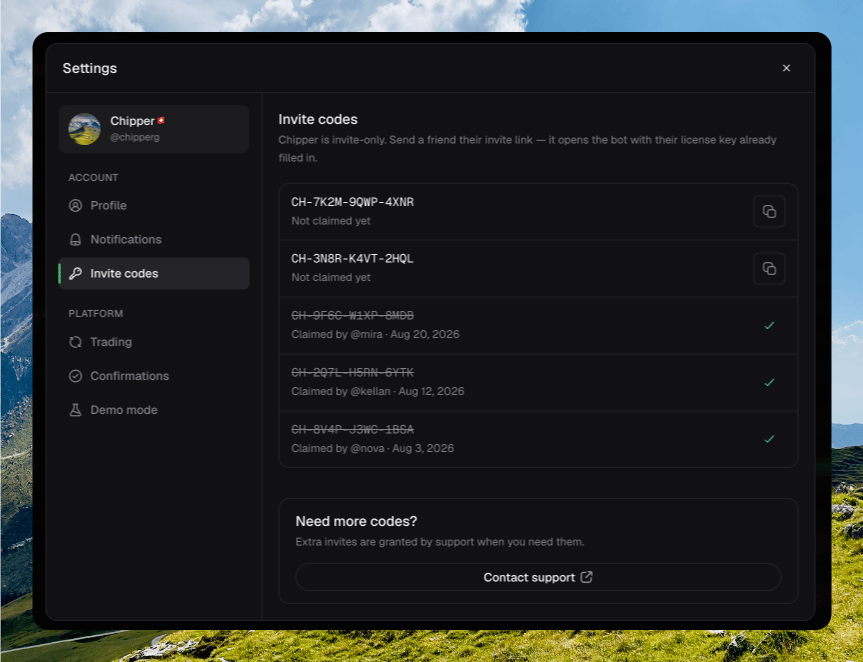
Available codes show **Not claimed yet**. Click **Copy invite link**. Chipper copies the redeem link and confirms **Invite link copied**.
After someone redeems the code, the row shows **Claimed by** their name and the date. Claimed codes cannot be copied again.
If you have no codes yet, the panel shows **No invite codes**. Codes appear once they are issued to your account.
## Need more codes?
Extra invites are granted by support. Click **Contact support** at the bottom of the panel.
## Sharing a code
Available codes show **Not claimed yet**. Click **Copy invite link**. Chipper copies the redeem link and confirms **Invite link copied**.
After someone redeems the code, the row shows **Claimed by** their name and the date. Claimed codes cannot be copied again.
If you have no codes yet, the panel shows **No invite codes**. Codes appear once they are issued to your account.
## Need more codes?
Extra invites are granted by support. Click **Contact support** at the bottom of the panel.