> ## Documentation Index
> Fetch the complete documentation index at: https://docs.chipperg.xyz/llms.txt
> Use this file to discover all available pages before exploring further.
# Activity
> A record of everything Chipper has done for you.
Activity is the account log. Open it from the header, press **G** then **A**, or press **⌥ A**. After a wallet action, **View in activity** lands here too.
## The activity log
Each row is one event. The table has four columns.
| Column | What it shows |
| ---------- | ---------------------------------------------------------------------------------------------------------------- |
| **Type** | Buy, Sell, Transfer, Funding, Deploy, Token, Wallet, or Other. |
| **Event** | What happened, plus a short detail when Chipper has one. |
| **Amount** | The size of a buy, sell, transfer, or fund, or how many wallets were touched. Credits are green. Debits are red. |
| **Age** | How long ago it occurred. |
Scroll to load more. Rows are read-only. There is no per-row drawer.
Overview shows the latest eight rows. **View all** on that panel opens this page.
## Filters
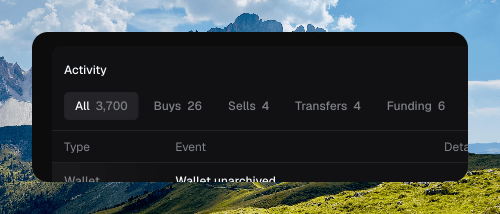
The chips above the table change which events you see. Each chip has a count.
* **All**
* **Buys**
* **Sells**
* **Transfers**
* **Funding**
* **Deploys**
* **Tokens**
* **Wallets**
* **Other**
 ## Search
The search field filters the log. Press **⌘ F** on this page to focus it.
If nothing matches, Chipper shows **No matching activity**. With no search and an empty log, it shows **No activity yet**.
A token's own history lives on the [token page](/trading/token-page), under the **History** tab. Press **H** there.
## Search
The search field filters the log. Press **⌘ F** on this page to focus it.
If nothing matches, Chipper shows **No matching activity**. With no search and an empty log, it shows **No activity yet**.
A token's own history lives on the [token page](/trading/token-page), under the **History** tab. Press **H** there.