> ## Documentation Index
> Fetch the complete documentation index at: https://docs.chipperg.xyz/llms.txt
> Use this file to discover all available pages before exploring further.
# Drafts
> Save a launch you are not ready to run.
A launch draft is the launch config Chipper stores on the server. You can close the tab, switch devices, and pick it up again.
Reusable launch configs are drafts. They are not [presets](/platform/presets).
## How drafts work
Chipper autosaves while you edit. The first save happens after you leave the Token step, or as soon as you fill in a token detail such as name, ticker, image, description, or a social.
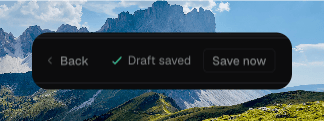
The URL becomes `?draft=` plus the draft id. The footer shows **Saving**, **Draft saved**, **Unsaved changes**, or **Save failed**.
Drafts follow your account. You must be signed in to save or open them.
 ## Saving and resuming
Keep editing and Chipper saves in the background. Click **Save now** if you want to force a write. Chipper asks you to **Sign in to save drafts** or **Add token details before saving** when those are missing.
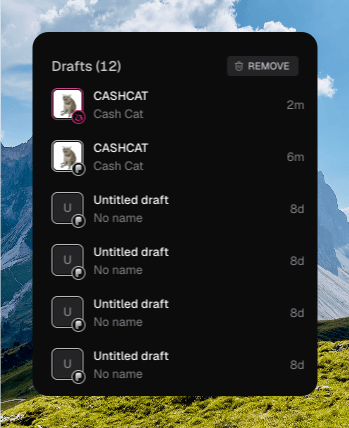
Resume a draft from the Launch sidebar on [Tokens](/trading/tokens). Each row shows the ticker or name and how recently it was updated. Click a row to open `/tokens/new?draft=…` at the same step you left.
A draft that fails to load shows **Couldn't load this draft** and **Start a new launch**.
After a successful launch, Chipper clears that draft. A failed launch can leave the draft in place so you can retry.
## Managing drafts
The sidebar header reads **Drafts (N)**.
* Open the row menu, or right-click the row, and click **Delete** to remove one draft.
* **REMOVE** deletes every draft. Hold to confirm **Remove all drafts**. That cannot be undone.
An empty list says **No drafts yet** and offers **Create token**.
## Saving and resuming
Keep editing and Chipper saves in the background. Click **Save now** if you want to force a write. Chipper asks you to **Sign in to save drafts** or **Add token details before saving** when those are missing.
Resume a draft from the Launch sidebar on [Tokens](/trading/tokens). Each row shows the ticker or name and how recently it was updated. Click a row to open `/tokens/new?draft=…` at the same step you left.
A draft that fails to load shows **Couldn't load this draft** and **Start a new launch**.
After a successful launch, Chipper clears that draft. A failed launch can leave the draft in place so you can retry.
## Managing drafts
The sidebar header reads **Drafts (N)**.
* Open the row menu, or right-click the row, and click **Delete** to remove one draft.
* **REMOVE** deletes every draft. Hold to confirm **Remove all drafts**. That cannot be undone.
An empty list says **No drafts yet** and offers **Create token**.