> ## Documentation Index
> Fetch the complete documentation index at: https://docs.chipperg.xyz/llms.txt
> Use this file to discover all available pages before exploring further.
# Creator Fees
> Claim what a token you launched has earned.
Creator fees accrue from trading on a token you launched. Claim them to the current recipient wallet.
Not every token has creator fees. The **Creator Fees** row appears on the [token page](/trading/token-page) when Chipper can load a balance for that token.
## Where to find them
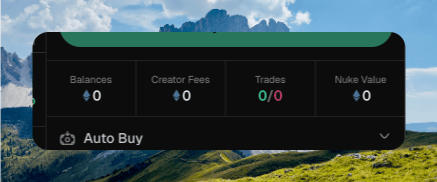
Open the token, then look at the trade sidebar. **Creator Fees** sits with **Balances**, **Trades**, and **Nuke Value**.
Click the box to open the **Creator Fees** dialog.
 Attach the current fee recipient wallet to the token before you can claim or redirect fees. The row still shows whenever this token has creator fees.
## Checking your balance
The dialog title is **Creator Fees**. The summary is labeled **Unclaimed** when you can claim, or **Earned** when you cannot.
The amount uses the same native or USD toggle as the other sidebar totals. A secondary line shows the other unit when Chipper has it.
**Current recipient** is the wallet fees go to. If a redirect is waiting, **Pending recipient** shows the next address.
When there is nothing to claim, the description reads **No unclaimed creator fees right now. Check back after more trading activity.**
## Claiming
Hold **Hold to claim** when the balance is above zero. Fees land in the **Current recipient** wallet.
Zero balance shows **Nothing to claim**. A recipient Chipper cannot sign with shows **Not claimable**.
Chipper toasts **Creator fees claimed!** when the claim lands. Token history can filter to **Creator fees**.
## Redirecting fees
Some protocols let you send future fees to a different address. When that is available, the dialog shows **Redirect fees**.
Pick **Wallet** to choose a Chipper wallet, or **Address** to paste an EVM address. Click **Redirect Fees**.
Redirects can be timelocked. Chipper then shows **Pending recipient** and toasts **Redirect confirmed; waiting for timelock**. You cannot redirect to the wallet that already receives the fees.
Attach the current fee recipient wallet to the token before you can claim or redirect fees. The row still shows whenever this token has creator fees.
## Checking your balance
The dialog title is **Creator Fees**. The summary is labeled **Unclaimed** when you can claim, or **Earned** when you cannot.
The amount uses the same native or USD toggle as the other sidebar totals. A secondary line shows the other unit when Chipper has it.
**Current recipient** is the wallet fees go to. If a redirect is waiting, **Pending recipient** shows the next address.
When there is nothing to claim, the description reads **No unclaimed creator fees right now. Check back after more trading activity.**
## Claiming
Hold **Hold to claim** when the balance is above zero. Fees land in the **Current recipient** wallet.
Zero balance shows **Nothing to claim**. A recipient Chipper cannot sign with shows **Not claimable**.
Chipper toasts **Creator fees claimed!** when the claim lands. Token history can filter to **Creator fees**.
## Redirecting fees
Some protocols let you send future fees to a different address. When that is available, the dialog shows **Redirect fees**.
Pick **Wallet** to choose a Chipper wallet, or **Address** to paste an EVM address. Click **Redirect Fees**.
Redirects can be timelocked. Chipper then shows **Pending recipient** and toasts **Redirect confirmed; waiting for timelock**. You cannot redirect to the wallet that already receives the fees.