> ## Documentation Index
> Fetch the complete documentation index at: https://docs.chipperg.xyz/llms.txt
> Use this file to discover all available pages before exploring further.
# Sign in
> How to access your Chipper workspace.
Chipper uses Telegram for authentication. There are no passwords to remember and no seed phrases required to create an account—your workspace is securely tied to your Telegram identity.
**Chipper is invite-only.** Access is granted through Telegram. If you don't have an account yet, you can message the team for an invite or redeem a license key if you already have one.
## How to sign in
To access the platform, you need to request a one-time login link from the official Chipper Telegram bot.
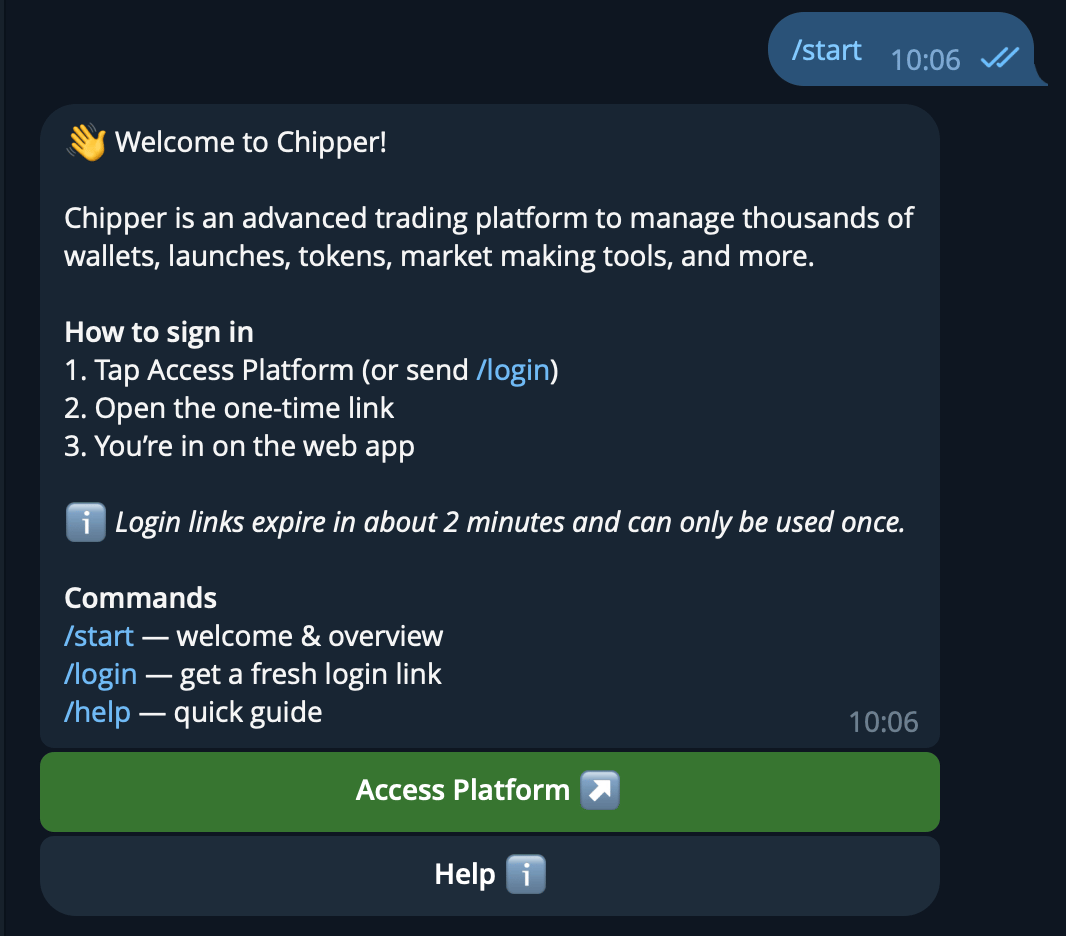 Open Telegram and navigate to **@ChipperAccountBot**. If this is your first time, tap **Start** or say hello.
Tap the **Access Platform** button in the bot menu. The bot will generate a secure, one-time login link just for you.
Tap the link provided by the bot. It will automatically open Chipper in your browser and sign you in.
**Session security:** The login link is single-use. If your session expires or you log out, simply return to the Telegram bot and tap **Access Platform** again to get a fresh link.
Open Telegram and navigate to **@ChipperAccountBot**. If this is your first time, tap **Start** or say hello.
Tap the **Access Platform** button in the bot menu. The bot will generate a secure, one-time login link just for you.
Tap the link provided by the bot. It will automatically open Chipper in your browser and sign you in.
**Session security:** The login link is single-use. If your session expires or you log out, simply return to the Telegram bot and tap **Access Platform** again to get a fresh link.